> ## Documentation Index
> Fetch the complete documentation index at: https://docs.comfystream.org/llms.txt
> Use this file to discover all available pages before exploring further.
# Feature Bank
> Improve temporal consistency of real-time using feature banks.
This node is implemented based on the research paper ["Looking Backward:
Streaming Video-to-Video Translation with Feature
Banks"](https://arxiv.org/pdf/2405.15757). See the
[Acknowledgments](#acknowledgments) section for details.
## Introduction
The **Feature Bank** node improves **temporal consistency**—the visual coherence between consecutive frames—in generative video models by **caching and reusing features** from earlier frames. This reduces flickering and enables smoother transitions, resulting in a more stable visual flow. By controlling how much these cached features influence each frame, it also enables fine-grained **stylistic consistency**—especially valuable in **real-time contexts** where visual stability is essential.
## Visual Comparison
The video below compares a [baseline workflow](https://github.com/livepeer/ComfyUI-Stream-Pack/blob/main/examples/workflows/sd15-tensorrt-api.json) with a [real-time workflow using Feature Bank](https://github.com/livepeer/ComfyUI-Stream-Pack/blob/main/examples/workflows/sd15-tensorrt-feature-bank-api.json). Compared to the baseline, the Feature Bank provides:
* **Reduced Flickering** – Backgrounds and recurring objects appear more stable.
* **Improved Temporal Consistency** – Objects retain consistent form, texture, and color across frames.
* **Smoother Motion** – Transitions feel more natural, with fewer visual jumps or jitters.
## How It Works
The Feature Bank node enhances temporal consistency by integrating with the [self-attention layers](https://huggingface.co/docs/transformers/en/attention) of the diffusion model. It caches features from previous frames and re-injects them into future ones—stabilizing transitions without altering the underlying model.
It performs three core steps:
1. **Caching** – Stores attention features at regular intervals.
2. **Filtering** – Selects relevant cached features using cosine similarity.
3. **Injection** – Blends selected features into the current frame based on the configured strength.
The node supports any self-attention-based model (e.g., Stable Diffusion) and works with both **text-to-image (T2I)** and **image-to-image (I2I)** workflows.
## Adding the Node
An example T2I workflow using the Feature Bank node is available
[here](https://github.com/livepeer/ComfyUI-Stream-Pack/blob/main/examples/workflows/sd15-tensorrt-feature-bank-api.json).
Ensure the [StreamPack](https://github.com/livepeer/ComfyUI-Stream-Pack)
custom nodes are installed in your ComfyUI setup. Follow the [installation
instructions](/technical/custom-nodes/stream-pack/overview#installation) for
a step-by-step guide.
Right-click on an empty area of the canvas and choose **Add Node**.
Search for `Feature Bank` under the `StreamPack/model_patches/unet`
category.
Insert the node between your **Model Loader** and **Sampling Node**.
Wire up the inputs and outputs. The node runs automatically using the
parameters you set.
## Parameters
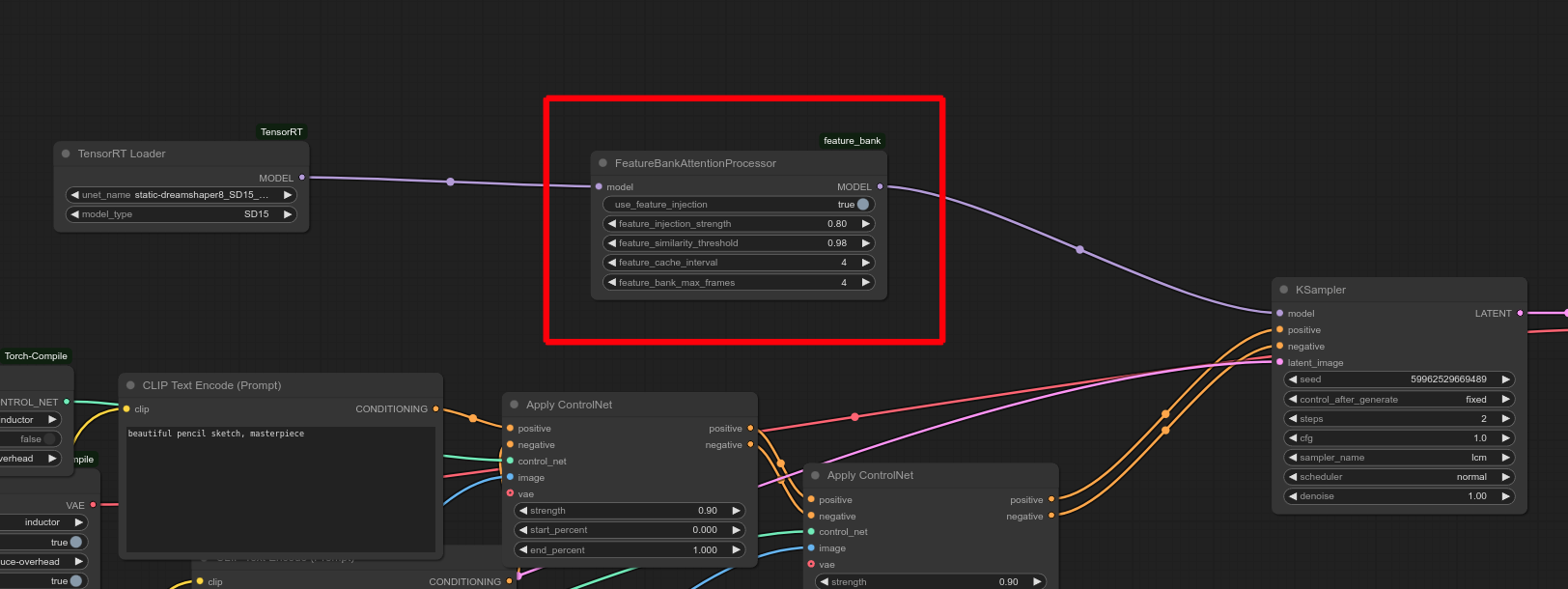
The following parameters can be configured in the Feature Bank node:
* **Start with a moderate cache interval.** Lower values improve consistency but increase memory usage.
* **Set injection strength gradually.** Start around 0.5 to balance coherence and novelty.
* **Match similarity threshold to your content.** Higher values are best for static backgrounds or subjects.
* **Use fewer cached frames for fast-changing scenes,** and more for looping or stable content.
* **Monitor memory use,** especially with low cache intervals or high resolutions.
* **Experiment creatively.** Small tweaks to injection or similarity can unlock unique visual styles.
**Feature Cache Interval**: Determines how often features from the attention
layers are cached (e.g., every 4 frames). Lower values improve consistency but
increase memory usage.
**Use Feature Injection**: Enables or disables the influence of cached
features. Set to `true` to activate the Feature Bank.
**Feature Injection Strength**: Controls how much influence cached features
have on the current frame (0 = none, 1 = full). A blended approach is possible
with values between 0 and 1.
**Feature Similarity Threshold**: Sets the minimum cosine similarity for
reusing cached features. Higher values ensure only relevant features are
reused.
**Feature Bank Max Frames**: Maximum number of past frames to cache. Older
frames are automatically discarded.
## Strengths and Limitations
While the Feature Bank offers major stability and stylistic benefits, it also introduces a few trade-offs depending on your use case.
### Strengths
* **Improved Temporal Consistency** – Reduces flickering and stabilizes frame-to-frame transitions.
* **Stylistic Control** – Adjust the influence of past frames for consistent or evolving styles.
* **Creative Exploration** – Enables novel stylistic variations by selectively injecting past features.
### Limitations
* **Reduced Novelty** – High injection strength may overly rely on past frames, limiting new details.
* **Memory Usage** – Storing features increases memory consumption, especially at high resolution.
* **Parameter Tuning** – May require iteration to balance consistency and variation effectively.
## Acknowledgments
This node is based on the research paper ["Looking Backward: Streaming Video-to-Video Translation with Feature Banks"](https://arxiv.org/pdf/2405.15757) by **Liang et al. 2023**. We thank the original authors for their contributions and collaboration in adapting this concept for **ComfyUI**.
If you use the Feature Bank node in your research or refer to the paper’s results, please cite the following:
```bibtex theme={null}
@article{liang2024looking,
title={Looking Backward: Streaming Video-to-Video Translation with Feature Banks},
author={Liang, Feng and Kodaira, Akio and Xu, Chenfeng and Tomizuka, Masayoshi and Keutzer, Kurt and Marculescu, Diana},
journal={arXiv preprint arXiv:2405.15757},
year={2024}
}
@article{kodaira2023streamdiffusion,
title={StreamDiffusion: A Pipeline-level Solution for Real-time Interactive Generation},
author={Kodaira, Akio and Xu, Chenfeng and Hazama, Toshiki and Yoshimoto, Takanori and Ohno, Kohei and Mitsuhori, Shogo and Sugano, Soichi and Cho, Hanying and Liu, Zhijian and Keutzer, Kurt},
journal={arXiv preprint arXiv:2312.12491},
year={2023}
}
```
 ## Parameters
The following parameters can be configured in the Feature Bank node:
## Parameters
The following parameters can be configured in the Feature Bank node: